How to write down who owes you
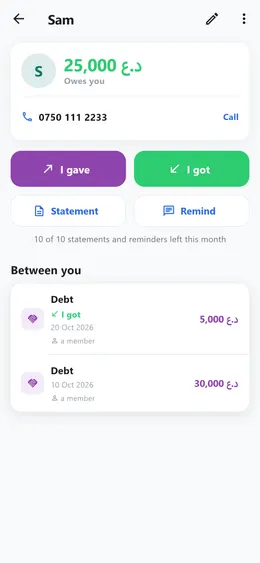
Everyone you lend to gets a page of their own. What you give and what comes back is written there, and the page always shows what is still owed.
Step by step
- Open «People» at the bottom of the screen and tap «New person».
- Write their name. The phone number is optional, but it is what lets a WhatsApp reminder go straight to them.
- On their page, tap «I gave» and write the amount: the goods or the money they took on credit.
- When they pay some back, tap «I got» and write what came back.
- The top of the page says what is left: «Owes you», or «Nothing owed» once it is settled.
Good to know
- Everything between you stays on their page, on any plan.
- Somebody you borrow from works the same way, the other way round: «I got» first, «I gave» when you pay it back.
- With Premium, a debt can also have a day it is due back by.
- Free on every plan.