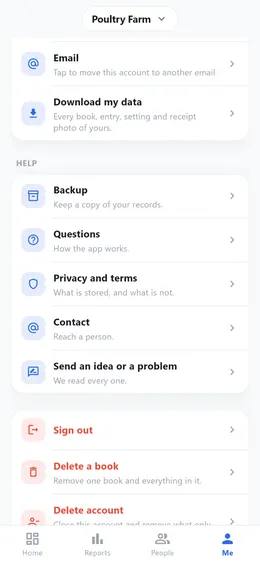
How to download all your data
Your records are yours. You can download all of it at any time, on any plan, without asking anyone.
Step by step
- Open «Me» and scroll down to «Download my data».
- Choose one of the three: «Excel sheet», «Complete file (JSON)», or «Everything, with receipt photos (ZIP)».
- The file is made on your phone. Keep it, or send it wherever you like.
Good to know
- «Excel sheet» is for reading and totalling: a sheet for each book. Entries in the trash stay out.
- «Complete file (JSON)» has everything, the trash and monthly rules included, for moving to another app.
- «ZIP» holds both, and every receipt photo in a folder for each book. It takes longer when there are many photos.
- Free on every plan.