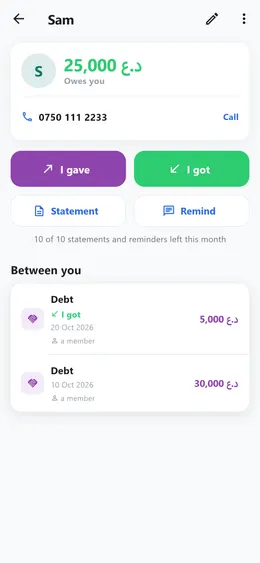
How to send a customer their statement and a WhatsApp reminder
From a customer’s page, one tap each: a statement of account with every entry between you, or a polite reminder on WhatsApp with the amount already written.
Step by step
- Open «People» and tap the customer.
- Tap «Statement». It lists every entry, oldest first, with what was owed after each, and the totals given and received. Look it over, then print it or send it.
- Or tap «Remind». WhatsApp opens with a short, polite message saying what is still outstanding. Read it, and send it yourself.
Good to know
- «Remind» shows only for someone who owes you, and «Statement» only once there is something between you.
- The reminder goes to the phone number on their page. Without one, WhatsApp asks who to send it to.
- Statements and reminders come with Premium: 10 a month, starting again on the 1st. The Business plan has no limit.